There is a stat that changes how you think about sales forever. Leads contacted within 5 minutes of submitting a form are 21 times more likely to convert than leads contacted after 30 minutes.
Most businesses are contacting leads 4 to 6 hours later. Some are contacting them the next morning. By then, the lead has moved on. They filled out three other forms. Someone else called them first.
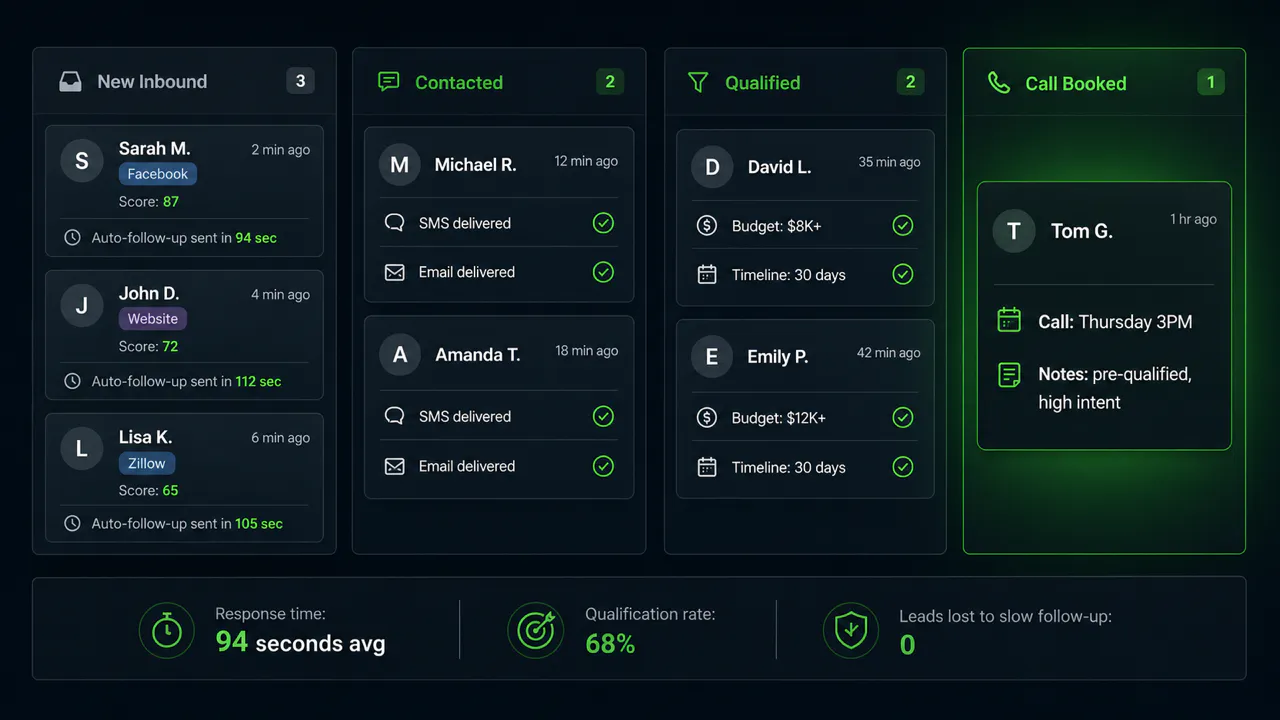
This guide shows you exactly how to build the system that contacts every lead within 90 seconds, automatically, consistently, whether it is 2pm on a Tuesday or 3am on a Saturday.
What This System Does (The Full Picture)
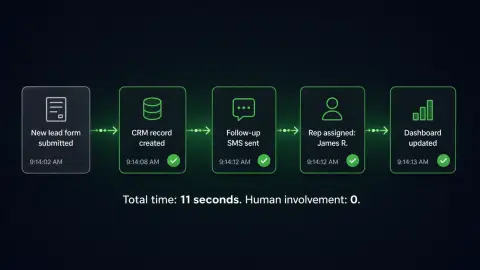
When it is running: Lead fills out a form → CRM record created (8 seconds) → lead tagged by source, service, and geography → first SMS sent from your number (90 seconds) → email follows 3 minutes later → if no response, follow-up fires on Day 2 and Day 5 → sales rep gets a Slack notification with the full context. No manual data entry. No "did anyone follow up on this?" No leads dying in an inbox.
What You Need Before You Build
- A lead form (website form, Facebook Lead Ads, or any source that can send a webhook)
- A CRM with an API (GoHighLevel, HubSpot, Pipedrive, or Airtable)
- An automation platform (n8n or Make.com)
- SMS capability (Twilio, or GoHighLevel's built-in SMS)
- A calendar link (Calendly or Cal.com)
Step 1, Set Up the Lead Trigger
Every lead source needs a webhook or native integration, this is the signal that fires the automation. Website form builders (Typeform, Jotform, Gravity Forms) support webhooks natively; point them at your automation platform's endpoint. For Facebook Lead Ads, connect via the native lead integration in Make.com or the Graph API in n8n, and test with a real submission because the field names are often not what you expect. For multiple sources, use a single n8n webhook that accepts all of them and branch on the source field, that keeps your automation maintainable instead of six separate flows.
Step 2, Create the CRM Record
This is where most people make the first mistake: they map fields 1:1 from the form to the CRM and stop there. Do more. At record creation, also tag with source ("Facebook Lead Ads, Campaign Name"), tag with geography (match zip to territory or agent), set the lead stage to "New Inbound," set the owner by round robin or territory rule, and log the full form data in a notes field so the rep sees everything in one place.
Step 3, Fire the First Contact
The first SMS is the most important message you will send, and where most businesses make it feel robotic. Rules: under 25 words, name them, reference what they actually asked about (not "Thank you for your inquiry"), and soft-close with a calendar link or a question instead of a hard sell.
"Hi Sarah, it's James from Apex Realty. Saw your inquiry about listings in Austin. Quick question, are you looking to move in the next 3-6 months, or longer term?, [calendar link]"
Got leads sitting uncontacted right now?
This is the highest-value hour you can spend this week. We have built this exact system for real estate teams, HVAC companies, clinics, and agencies. We'll scope yours in 30 minutes.
Step 4, Build the Follow-Up Sequence
The first message is the start, not the end. Most prospects will not respond immediately. Here is the sequence that works, and everything after Day 0 is conditional: if the lead responds or books, the sequence stops.
| Day | Message | Channel | Purpose |
|---|---|---|---|
| 0 (immediate) | Short intro + calendar link | SMS | First contact while warm |
| 0 + 3 min | Branded email with more context | Second touch, gives more info | |
| Day 2 | Short check-in + calendar link | SMS | Assumes they're busy, not gone |
| Day 5 | Value message (case study, how it works) | Nurture for research-mode buyers | |
| Day 10 | Final reach-out + ask | SMS | Clear close, lets them say yes or no |
Step 5, Notify the Rep with Full Context
The rep should never have to go find information, it should come to them. When a new lead enters: a Slack message to the assigned rep with name, source, interest, phone, email, and a CRM link, plus an auto-created task. When a lead responds: a Slack message with their last message. When a lead books: a Slack message with the date, time, and any qualification answers captured.
Step 6, Track It (The Metrics That Actually Matter)
- Response rate within 5 minutes, target above 95% (automation never misses)
- First response-to-reply rate, how many leads reply to the first SMS (benchmark: 18-30%)
- Book rate, what percent of engaged leads book a call
- Lead-to-qualified rate, helps you spot bad lead sources vs good ones
Which Tool to Use, n8n vs Make.com
Use Make.com if you want to start fast, you are not technical, and your lead sources have native integrations (Facebook, HubSpot, etc. are all in Make). Use n8n if you have multiple sources that need custom handling, you want the data on your own server, or you are going to add complexity over time. Cost: Make.com starts at $9/month for low volume; n8n is free self-hosted or ~$20/month cloud.
The businesses that win on leads are not the ones with the best product or the loudest ads. They are the ones that show up first. This system is not advanced AI and it is not expensive. It is the fundamental plumbing that means your business shows up within 90 seconds, every time, regardless of who is awake. Build it once. Let it run.
Part of a bigger guide