Real client
Sales team's commission sheet adds up on both paydays
A sales team paid its closers twice a month from a Google Sheet that kept breaking. We rebuilt it so each closer's payout, close rate and no-show rate match on both payout days.
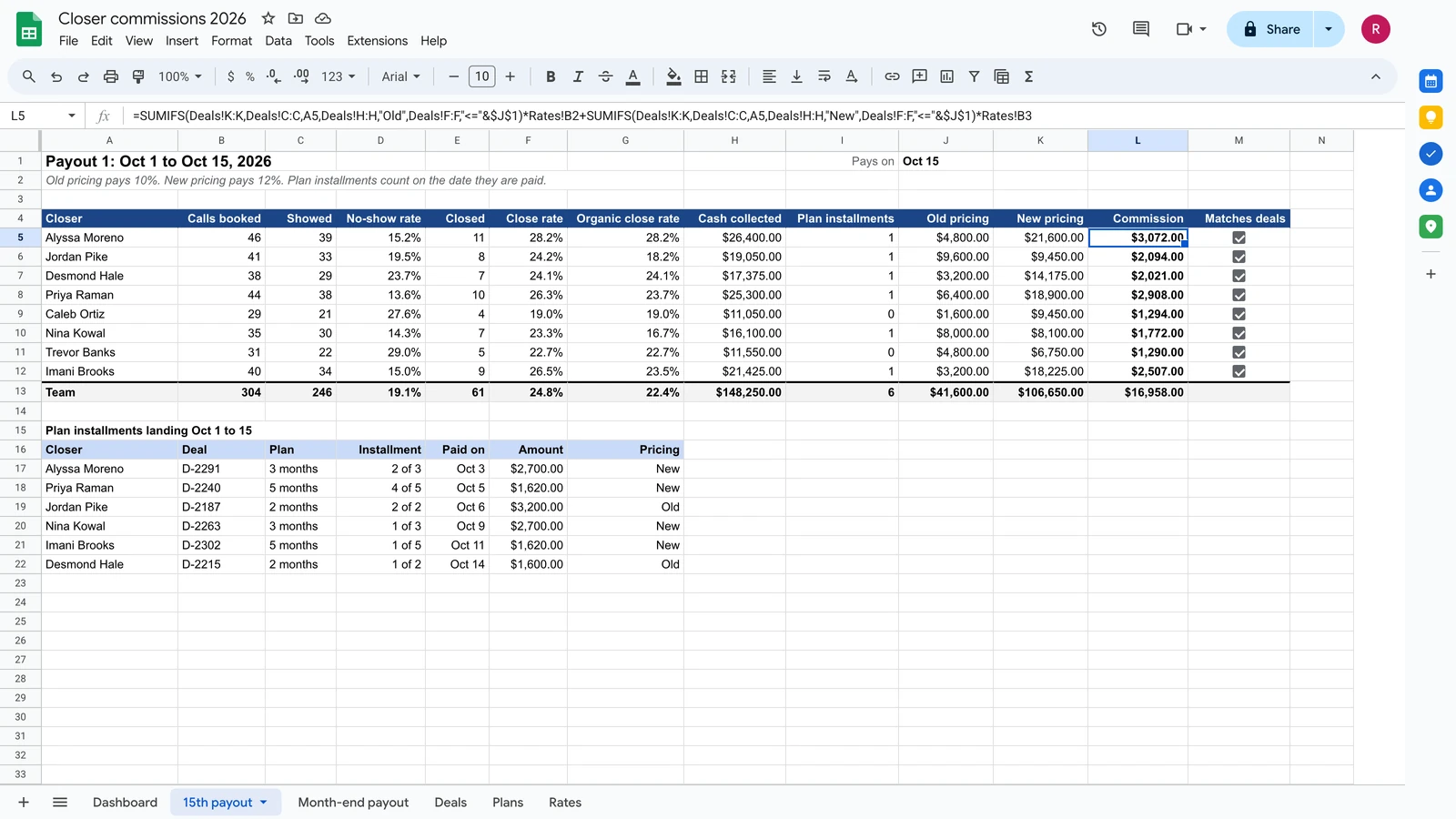 Rebuilt on test data
- Trade
- Sales team on commission
- Team
- Several closers
- Client since
- May 2026
- Repeat work
- Kept coming back with updates through Sep 2026.
- Tools
 Google Sheets
- Apps Script
Before and after
Payday came twice a month, and the numbers did not always add up.
| Before | After | |
|---|---|---|
| Payout on the 15th | Fixed by hand before paying, and still off | One number per closer that adds up |
| No-show rate | Two different values on one sheet | One value, top to bottom |
What we built
- Two payout days. A view for the 15th and one for month end.
- Old and new pricing. Each deal pays at its own rate.
- Payment plans. 2, 3 and 5 month plans count in the right month.
- Stats that match. Close rate and no-show rate agree across the sheet.
- A dashboard per closer. Ranges grow with the data, so new rows do not break it.
How it works
- Deals and payments are loggedGoogle Sheets
- Commission is worked out for old and new pricing and payment plansApps Script, formulas
- Each closer gets a payout view for the 15th and month endGoogle Sheets
- Close and no-show rates match top to bottomGoogle Sheets
What broke and how we fixed it
What broke
One closer's commission came up a few dollars short. The no-show rate showed two different values on the same sheet.
How we fixed it
We rebuilt the logic so every payout and every rate matches, top to bottom.
Fixing the commission sheet before every payday?
Tell us your commission rules and payout days. We will show you where the numbers split.
Or send one sample file on WhatsApp (opens WhatsApp). Fake names are fine.
We reply within one business day. No card, no contract.
More builds like this
He tried for two weeks to build the report himself. The presentation was the next morning.
 Rebuilt on test data
Broadcast ad sales
He built his own app with AI. It grew past him, and every fix to one part broke three others.
 Rebuilt on test data
Law firm marketing agency